Category: Productivity

  • New use of Wii controller helps you swim through data

    The ability of the Wii controller to sense our relative position and movement through space has created a gaming sensation. Here’s an example of using this same controller to interact with a 3D model, showing uncanny perspective.

    The implications for how this interface could allow us to explore data are exhilarating. But what data? I have two examples:

    Visual Thesaurus Anyone who has used the Visual Thesaurus knows what I mean when I talk about “swimming through data” (the video demo is embedded below). This interface translates all of the interconnectivity of a thesaurus into linked “nodes” that advance, recede and move out of our way as we dig deeper into the connections. One could conceivably move from node-to-node for hours, never reading the same word or phrase twice. And in such an experience, one would walk away understanding not only the meanings of words but how they are interrelated. This is invaluable.

    Walk2Web The developers of this application show an appealing way to see how web sites are interconnected through their hyperlinks. In other words, a swim that had you diving off here, at this post, would lead you to both the Visual Thesaurus site and Walk2Web site. The journey would continue to the many sites from which these sites link. The interface shows summary information about each site along the trip, providing context and meaning to the interconnections. Again, you walk away understanding more about this “data set,” and learning a ton!

    When Visual Thesaurus arrived on the scene many years ago, the concept was thrilling. The interface, with its enticing movement through two dimensions, was impressive. But how much better to involve the whole body — and a third dimension! — in the exploration of this network of interrelated concepts.

    Do you have a favorite example of applications you could see more appealingly “swim-able” using this Wii controller and 3D visualization technology?
  • Mindfulness the Google way by Jon Kabat-Zinn

    Merlin Mann is one of my favorite productivity bloggers. And similar to how you feel when you learn that two old friends have met and hit it off, I was pleased yesterday to read his post on an influential teacher in my life: Jon Kabat-Zinn, founder of the Center for Mindfulness in Medicine, Health Care, and Society.

    At about the same time that I was gaining my stride in my professional life, a chronic pain situation nearly ended it. Then I learned about what this fellow was doing, deep in the bowels of the University of Mass. Medical Center. I learned about Kabat-Zinn and his “de-dogma-ized” meditation program in a segment of a PBS special, Bill Moyers’ Healing and the Mind. What followed is a journey I’m still on.

    Read Merlin’s post, and check out the YouTube video it describes, which was shot on the Google campus.

    April 1 Update: Here’s an account of the health benefits of this type of meditation, from yesterday’s BBC News site.

  • Boost your office productivity with a bigger screen

    Over the years, many of my co-workers have used two monitors to get work done. Others have swapped “standard issue” monitors for larger ones. Their explanation is always the same. Information work is all about work space real estate, and these set-ups make them more productive. Evidence has suggested to me that they’re right. Now from the Wall Street Journal comes further validation.

    This piece reports on a study that was financed by NEC, but vetted by a more objective body (the university’s research board):

    Researchers at the University of Utah tested how quickly people performed tasks like editing a document and copying numbers between spreadsheets while using different computer configurations: one with an 18-inch monitor, one with a 24-inch monitor and with two 20-inch monitors. Their finding: People using the 24-inch screen completed the tasks 52% faster than people who used the 18-inch monitor; people who used the two 20-inch monitors were 44% faster than those with the 18-inch ones.

    The conclusion is a worker could save upwards of 2.5 hours a day by using a bigger monitor. This is far more than I would have expected.

    Do you use a monitor that’s around 24-inch? Or two? If so, I assume you have the free time to comment. As for me? I’m writing this on my lunch break, with little time to spare. I need a bigger monitor baaaddd!

  • Google Reader replaces that stack of half-read books

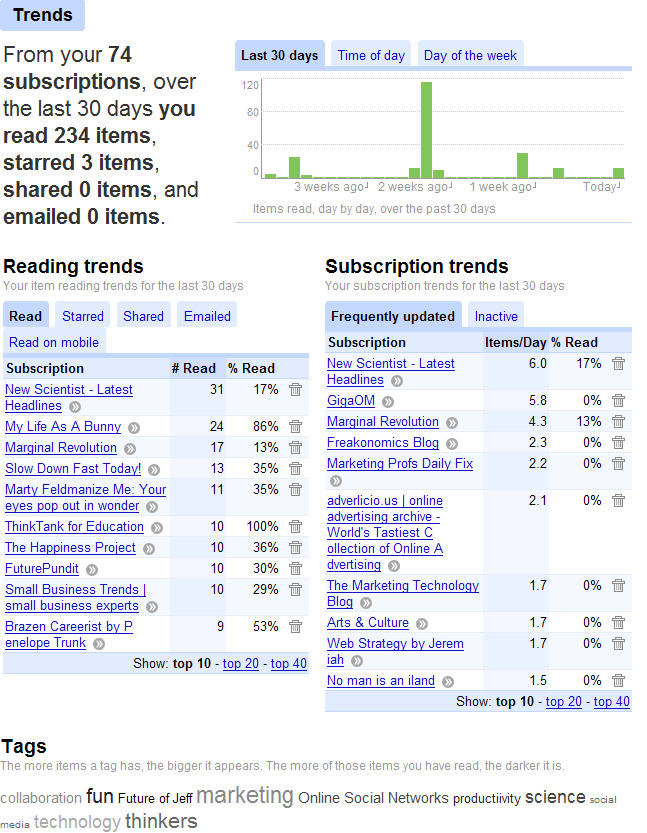
    Thank you, Google. I think. Today for the first time, I clicked a mysterious link in my Google Reader (which reads RSS feeds — click on the “Subscribe”button above if you don’t know what those three letters stand for). The link is labeled “Trends.” Below is what I found when I clicked it.

    My so-called reading habits. Click if you’re the nosey type and want my top-read blogs

    Oh, I see. That’s why I have over 1,000 unread items in my Google Reader.

    So which is worse: Having to look at a stack of half-read books and looming New Yorker and Economist magazines (more on taming them later this week), or visiting Google Reader and being greeted with a chart of my crap reading habits?