Opinions are all my own

  • Ogilvy on web advertising

    My alternate headline for this post is: Winning web headlines can be long, but watch your column widths. Here’s why …
    Ogilvy On AdvertisingThe book that first inspired me to get into direct response — a move that led directly to my love of interactive marketing — was written by a famous ad man. Remarkably, David Ogilvy’s Ogilvy on Advertising is still in print. More remarkable is how much of his advice on successful direct marketing, print and television ads is still relevant. And directly transferable to the web.

    I was thinking of him again today when I was in a design meeting where one of our web designers was counseling against an overly wide column of text. He said, “We don’t want this column to span more that 400 characters. More than that fatigues the reader.” Wow, I thought. This advice is almost verbatim from a book that predates the web as we know it by at least 10 years.

    Headlines are another source of attention — and often misunderstanding. Although headlines linking to web pages can be short and still be effective, they should be long enough to get the job done. Abe Lincoln, when asked how long a soldier’s legs should be, was said to have answered, “Long enough to reach the ground.”

    I’ve learned a lot by following the advice of the excellent Brian Clark, in his CopyBlogger. He periodically singles out strong headlines, based on his experience in the business. (And thanks again, Brian, for citing one of mine). His criteria remind me a great deal of Ogilvy’s, which was based on some of the deepest readership research done at the time for advertising. Here is Ogilvy’s take on the headline:

    [Our research] reports that [print] headlines with more than 10 words get less readership than short headlines. On the other hand, a study of retail ads found that headlines of 10 words sell more than short headlines. Conclusion: If you need a long headline, go ahead and write one.

    Other tidbits of his that apply to online headlines and links include the following:

    • Headlines containing news are “surefire” — they are recalled by 22% more people than ads without news (and lots of pay-per-click research shows that they generate more clicks)
    • Never use all capital letters — they’re less readable in both print and online. And with the web, people may think you’re shouting, to cite the classic email netiquette tip
    • Whenever possible, promise a benefit

    So what is the longest character count we counsel for headlines? Keep them to 75. It’s the standard set by Digg for their listing’s headlines. And this number is just a few characters greater than the number that is indexed by Google (according to lore and legend) when Google’s spiders read a page’s Title tag.

    Which brings up an argument in favor of the longer headline that Ogilvy couldn’t have anticipated. Length improves the chances of including a keyword that will move your page higher in search engine results pages. That’s the sort of down-and-dirty selling tactic that the late Mr. Ogilvy would have loved.
  • Twitter sends flotsam and jetsam our way. Marketers: Take notice!

    It’s been called a micro-blogging platform, an electronic water cooler and a wonderful way to keep tabs on friends and family. It’s Twitter, and all I wanted to know is: Is this something marketers should be tracking? Here’s my answer.

    Yes.

    You should track Twitter. But do it on your own terms. Or simply keep tabs on someone who is on the Twitter network. This concept will definitely morph, but it is not going away.

    As promised in the footnote to my dismissive blog entry about this technology, I will recount my 14 days in Twitterland. For those who need a grounding in what Twitter is, I suggest you click on the link above. It loads in a new browser window, so you won’t lose your place. Are you back? Okay, let’s do this thing.

    The first thing I discovered was that the people who would never, ever get a blog, or comment on other people’s blogs, have willingly signed up for Twitter. They have eagerly posted their 140 characters of news, weather and sports. I joke, but these posts do often resemble what contemporary television news has devolved into: The most superficial look at important headlines, plus trivia and human interest. And in saying that, I do not mean to disparage, because, like local news, this is very addictive.

    Especially when you’re a friend or relative of the fellow “newscasters.”

    When you’re part of this micro-blogosphere, all other activity you’re engaged in at that moment comes to a brief halt while you check your computer screen, IM window, or cell phone text messages to learn such tidbits as: “Man, that soup was hot. It scalded my mouth!” I’m making this one up, but it’s the type of flotsam and jetsam that comes drifting your way when you dip your oar in the vast Twitter Ocean.

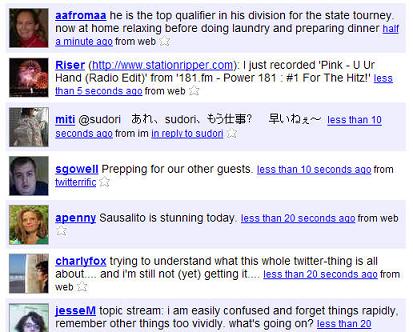
    Below is a sample I grabbed just now from the Twitter Public Timeline, a real-time stock ticker of global “Tweets” from those willing to share their tidbits with the world.

    A sample from the Twitter public timeline

    Again, I must assure you that I am not dismissing this type of information exchange. Just as the real definition of flotsam and jetsam is “potentially valuable goods jettisoned from a ship,” there are many gems that are shared with the friends, family and co-workers that one lets into one’s network. These gems slide into view suddenly and quietly, along with the detritus. It’s all disposable, but at the same time riveting.

    In my 14 days on a small Twitter network (less than 10 participants), I’ve learned things. Oh, yes. I’ve learned quite a bit.

    I’ve been sent links to interesting sites and videos. I’ve gotten to know more about distant friends’ lives. I’ve even discovered that I’ve missed an important appointment. And none of this was in my email box, which is crammed enough as it is. This is good on a micro level. And this is potentially important on a macro level.

    I suspect that when the next Twin Towers catastrophe occurs, those on a Twitter network will get important and potentially life-saving alerts (“A plane just hit the second tower!”). Remember: On 9/11/01, when the voice lines of cell phones were jammed and inaccessible, and the electricity was off, the last goodbyes were sent to loved ones via cell phone SMS text messages. Grimly, this form of communication was still available, for brief, real-time expressions of fear, resignation and undying love.

    If my suggestion of Twitter having that kind of utility shocks you, I must say it shocked me too. But it is also something that follows a clear path. Anthropologist Danah Boyd stated recently that initial web sites — we’ll call them Web 1.0 — were about ideas. With web sites and simple emails, people who didn’t know each other before became acquainted around shared interests and passions. Web 2.0 is all about people. Since the web has become ubiquitous (at least with the majority of the young, and 100% of the world’s information workers), you could keep connected with nearly everyone you know, and even have them broker introductions to those you don’t know (the magic of MySpace and Facebook “friends” and LinkedIn “connections”).

    So what is the coming Web 3.0 about? Place.

    Or, more importantly, place and time. Who is where I am right now? Other systems like Dodgeball hinted at this promise of a real-world / virtual network. Twitter expands on that promise. It is about place in a big way.

    If you want to spend some mindless computer time, check out this Google mash-up of the Twitter public timeline. That will remind you of how quickly this world is shrinking … and help to demonstrate the global, and univeral, appeal of Twitter.

    Finally, I offer this challenge. I want to see if Twitter can help me get acquainted with some interesting, like-minded marketing types. So I’m going to do a little experiment: I’m posting my Twitter posts to the world for the next week, and see who might want to add me to their Twitter Friends list. Specifically, I want to know how many people I could get to know. Can I connect with individuals whose flotsam and jetsam would make for an interesting and instructive complement to the Tweets I’m receiving now? And can some real business conversations come of it?

    I’ll let you know.

  • Two givens for all healthcare site upgrades: labor-savings and ease of use

    Content requirements for the web site of a healthcare system are formidable. Audiences include current and potential patients, as well as current and potential employees, physicians-with-privileges and donors. It’s no wonder that in their Ask the Experts piece, featured in a just-released Strategic Healthcare Communications newsletter, Dan Ansel and Susan Emerson recommend that the first step in planning site enhancements is to get a content management system. Their advice goes well beyond this tip, but two suggestions that I’ve never seen stated so bluntly are as follows:

    • Any enhancement should minimize the use of staff time, as this is often in short supply.
    • Any enhancement should be turnkey and simple to use. Simplicity and ease of use should apply to healthcare consumers and, just as important, to staff members who must administer the program.

    I can’t think of many categories of sites where so much service must be delivered by such a thin staff. Dan and Susan have acknowledged this throughout their excellent “how-to” article, reprinted on their Private Health News web site.

    NOTE: You may recall that I’ve talked about this company before, in a piece on generating ROI from your email newsletters.

  • New multitouch screens tickle the imagination

    We were born with sensitive fingertips and spent our first months experiencing our world primarily through touch. Fast-forward to later in our development. We learn about computers — one of the most important modern sources of communication, interaction and business. And what happens to tactile experience? Poof! Gone, or at least gone dormant. Instead, we risk carpal tunnel and terminal boredom (both meanings) as we literally beat out our thoughts into keyboards, one letter and mouse click at a time.

    It’s no wonder that a computing system designed to provide just a few scraps of visceral pleasure would generate a cult following. But even Apple’s desktop systems are limited by a keyboard and mouse as primary input devices. Bigger rewards can only come when we find better ways to receive our thoughts and intentions. The keyboard and mouse must go.

    Wired magazine knew this when one of its recent Expired/Wired triads was the following:

    Expired: Keypad

    Tired: Scroll Wheel

    Wired: Multitouch

    Although these blurbs never explain themselves, I’m fairly sure the editors of Wired were thinking about the work of Jefferson (Jeff) Han. His work in creating a multitouch monitor is old hat to a lot of tech people, but it’s still a miracle to the uninitiated. And it sure looks like the way we’re headed in computer interfaces. Han created a new way for touch screens to receive feedback from fingers and hands based on pressure and movement.

    Some of Han’s supporting software concepts have already been applied elsewhere, to smaller screens. For instance, the idea of two opposing fingers widening or coming together as a way to move or “flick” a virtual wheel is at play on the new Apple iPhone touch screen. But what is particularly exciting about Han’s creation is that, similar to the Nintendo Wii gaming device, his screen gets us up and moving. The Wii is even being used in retirement communities. And similar to the Wii, Han’s multitouch screen is an interface that meets our bodies and brains more than half way. Far more. Neither system requires an instruction manual.

    Here are two more reasons why I think this is taste of things to come for information workers everywhere:

    1. It is more natural — and I suspect far more productive — to think conceptually while manipulating ideas with a swipe of your hand rather than pinning them to a board like so many dead specimens, using words, paragraphs and tables. When we play games, do we scroll through a deck of cards? Do we type a ball into far left field?
    2. Human backs were not built for 90 degree angles. A recent study found the most comfortable sitting posture for your spine is 135 degrees. Which basically has you working from a fully-reclined dentist chair! Instead, why not stand? Notice in this YouTube video how Jeff Han shifts his feet in a subtle dance. Sign me up for that job!

    Voice recognition and multitouch screens are, in my humble opinion, a combination we’ll be seeing in offices sooner rather than later. Your thoughts?

  • ShopText promises to make print ads more useful for impulse purchases

    The promise is scintillating: You’re paging through a magazine or newspaper, or you encounter an out-of-home ad (even, perhaps, a digital billboard), and you decide you simply must have that product. You type a six-digit short code into your cell phone, send the number a text message with a keyword, and after a verifying second text is received and replied to, your product has been ordered.

    The consumer wins by getting the product, and the marketer wins by fulfilling what may have been a passing whim. It’s the QVC network without ever going near a television or talking to an operator.

    That is the promise of ShopText, as described in a recent New York Times article.

    This technology’s potential audience is substantial. Everyone is aware of how ubiquitous the cell phone has become in our society. But what may be surprising to many is the fact that two out of every five users has sent a text message from their phone. According to recent M:Metrics statistics, 39.2% of cell phone owners send a text message at least once a month.

    Now imagine that you are paging through a newspaper and you see something about the latest Harry Potter book — the one that is being pre-sold now, and will be delivered in the early summer. And then let’s just say that you’re a huge fan of the series, and want to see if Harry dies in this concluding volume. And finally, let’s say for the sake of example that once you’ve pre-registered with the ShopText site, all you need to do is send out a text message, directed to the short code “467467” (think of short codes as cell-phone-specific mini phone numbers). The actual text message would be easy to type because it contains only one word – “Potter.” Done! That’s all you need to do to lock in your pre-release book and have it mailed to you when the official release date arrives.

    As you may have already surmised, this is no idle example. It’s exactly what I did, about four hours ago. The purchase took less than a minute. Time will tell if I become a satisfied customer, and even a repeat user. But since I really did want to lock in a copy for this new book, but kept forgetting to do so, this service fulfilled a real need that I had.

    What are the implications if this mobile purchasing system fulfills lots of other people’s needs, and truly catches on?

    Well, imagine trade shows where you can have samples and brochures sent back to your home or office (on the vendor’s dime of course). Or you could “buy” free or nearly free samples that you read about in display ads. These samples could be of just about anything – from cosmetics to pet supplies.

    I find this incredibly exciting.

    Watch this space to find out how this new consumer experience turns out for me. In return, I promise you I will be as objective as possible. Oh, and I won’t blab about Harry’s fate, if my copy arrives before you have a chance to read it yourself.

    I am boldly going on record now, though, to make two predictions about future purchases:

    1. If this quick, convenient way to purchase on impulse lives up to its promise, I definitely will be buying lots of other things this way 
    2. Regardless of the above, Harry will be buying the farm

    You read it here first.