Opinions are all my own

  • Finding B2B leads from your web logs

    Occasionally I share links to blog posts of others in my industry. Some things are too good to keep to myself. Here’s a perfect example, from Luna Metrics:

    We have a customer who considers the SEO we do for her to be one of her “sales channels” and we get ranked along with her other channels. She sends us reports when a lead comes in and when a lead is closed. The other day, I saw that she closed one that was worth not quite half a million dollars. (!! that was my reaction, too.) So I wrote her and said, how awesome. To which she replied,

    “Started with google analytics. Saw that they spent some time on the site… sicked Jane on a cold calling mission… after a bunch of calls she found the engineer at the company who was interested in the product. I flew out.. presented… sold and they put out a public bid. Our company is the low bidder and need to send a sample next week for review then release of contract.”

    So in case you are wondering, she was talking about the [Google Analytics] Network Locations report, which she mines daily for sales leads.

    It’s hard to believe all of this was accomplished by reviewing a typically-overlooked report in a totally free analytics package. Read the rest of their post, and check out this helpful post from the past on how to exploit the fact that many large organizations will self-identify in this report instead of resolving to their ISP’s name.

  • Visualizing bounce rates using brownie charts

    Today on Jason Fall’s Social Media Explorer, I discuss my new favorite data visualization technique — one that I’m starting to move into production with web analytics reports I create for clients. Its official name is the Tree Map, but as I mention in that post, I prefer to call it The Brownie Chart.

    That post has an example of how I use brownie charts to show a promising new web metric, the content interest index (CII). My example on the site uses a made-up business, Everything Brownies, with a web address of EB.com.

    Note: Yes, I know. That web address resolves to a real encyclopedia site. The reason I didn’t just make up a domain name is you never know when one will go live with a site. I didn’t want to have someone inform me, two months from now, that my blog is now pointing to a porn or gambling site! Unless Encyclopedia Britannica takes a surprisingly sleazy turn, I think I’m safe.

    Here is another example of how the tree map / brownie chart can make web analytics reporting easier to understand:

    Charting Bounce Rates: “I came, I saw, I puked.”

    I agree with Avinash Kaushik that bounce rates are a helpful way to measure how well you’re connecting with site visitors. Actually, he’s a little more enthusiastic than I am, with blog post titles such as this model of understatement: Bounce Rate: The Sexiest Metric Ever? Three years ago, on his own blog, Avinash described bounce rates this way:

    So what is this mysterious metric? In a nutshell bounce rate measures the percentage of people who come to your website and leave “instantly.”

    They’re the one-page visitors. Yes, they might be finding what they were looking for — but more often than not, these people just didn’t dig the neighborhood.

    Avinash has refined his description over time. In his recent, truly outstanding book on measuring web traffic, Web Analytics 2.0, he characterizes bounce rates this way: “I came, I saw, I puked.”

    Bounces can be reviewed for all traffic to a site, or only for certain important segments — traffic from search engines is a good example. Reporting of bounce rates can also be broken down by page.

    The brownie chart becomes particularly handy for this per-page bounce rate reporting. It helps those responsible assess the severity of a site’s problem pages.

    You see, you can’t easily be sure that a page with a high bounce rate really is a problem page. Think of it: If nearly everyone ups and leaves when they arrive at a particular page, but that page gets relatively little traffic, there’s no huge emergency. Content management resources are usually scarce, so it’s better to keep looking, for other pages that attract more page views that happen to have comparatively high bounce rates. It’s those more popular pages that require immediate first aid!

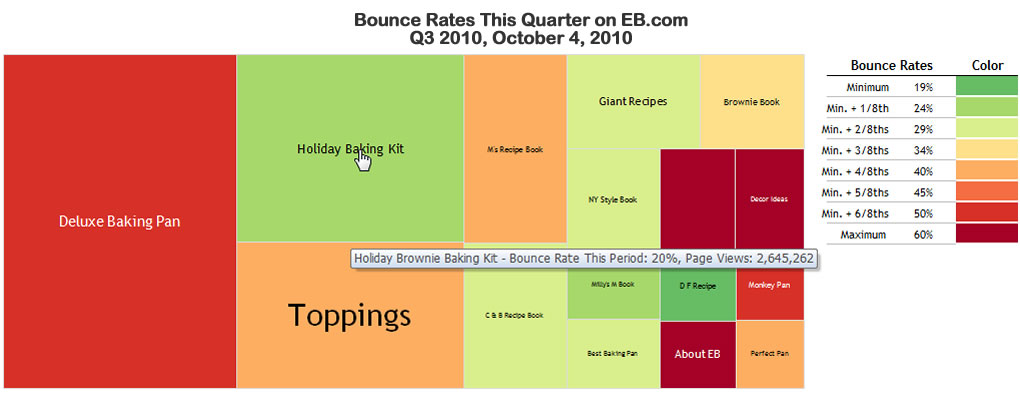
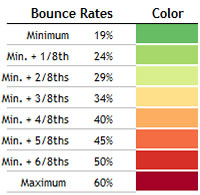
    To illustrate, take a look at Everything Brownies’ bounce rates on this brownie chart. The graphic shows all major pages of this fictitious site, and shows the pages as more red if they have the highest bounce rates relative to the others. You should know that size represents the relative numbers of page views. The bigger the “brownie piece,” the more views that page gets.

    What does this chart tell us? Quite a bit.

    The Holiday Brownie Baking Kit, which I placed my mouse over in this screen capture, has an excellent (i.e., low) bounce rate. It also has a ton of page views.

    That means this page is doing quite well in keeping visitors from leaving immediately. Well done! On the other hand, Deluxe Baking Pan is not nearly as successful. Its relative bounce rate is quite high, and because it has the most page views of the entire site, it’s clear this page is majorly dropping the ball!

    There are plenty more insights, but you get the picture.

    As I mentioned on Jason’s blog, what I like about this charting format is non-math types (such as myself!) can understand these statistics immediately, and know exactly what needs to be investigated further — and in what order of priority. As my friend Bob likes to say, “That’s good stuff!”

    I hope you find the potential of this charting technique as exciting at I do.

    A Round of Applause for BeGraphic and Sparklines for Excel

    This example of a fake report for EB.com, as well as the one on Social Media Explorer, was produced using an “Add-on” for Excel called BeGraphic. The Add-on consists of a whole suite of graphic tools — all based on Excel data and rendered within that application. The particular functions I used were part of Sparklines for Excel within the BeGraphic suite. I urge you to support the folks behind these amazing visualization tools.

  • How standard email marketing metrics fall short

    When you’re trying to optimize the profits of your business, most web metrics are unhelpful at least, and deceptive at worst. But what about the world of email marketing ? Kevin Hillstrom, in his excellent Mine That Data blog, gave this example to illustrate how conventional email metrics look at the wrong things:

    Say you have a list of 500,000 e-mail addresses. You send your standard campaign on a Monday. Later in the week, you tabulate your results:

    • 500,000 recipients
    • 20% open rate = 100,000
    • Of the opens, 20% click through to the website = 20,000 visit website
    • Of the clicks, 5% convert and buy something = 1,000 orders
    • Average Order Value = $100
    • Total Demand = 1,000 * $100 = $100,000
    • Demand per Recipient = $100,000 / 500,000 = $0.20 [per customer]

    He compares these finding with what you’d get if you did something called a mail/holdhout test. You compare a control group that does not get the email with a test group that does. For instance, he suggests this breakout:

    • Mailed Group = 400,000 Recipients, $300,000 spent = $0.75 per customer
    • Holdout Group = 100,000 Held Out, $45,000 spent = $0.45 per customer
    • Incremental Lift = $0.75 – $0.45 = $0.30 per customer

    Much more insightful!

    This is why I’m not a fan of open/click/conversion. A mail/holdout test proves the actual value of an e-mail marketing campaign. In this case, we observe $0.30 lift, whereas open/click/conversion yields $0.20 lift. E-mail marketers, why would you not want to know that your campaigns are working 50% better than when measured via opens/click/conversion?

    Kevin goes on to provide other interesting observations from his years of doing this sort of testing. You can’t go wrong by following his blog, and trying his approach to data-driven online marketing.

  • Join the Bum Rush for Charity Water!

    I’ve been blogging about the book series Age of Conversation, and its affiliated Social Media Bum Rushes for charity, since the first one in 2008. I’m proud to have a chapter in their latest volume, Age Of Conversation III: Time To Get Busy. Within its pages I’m in extremely good company, with 170 other social media pros. My very brief chapter (really a micro-chapter, with a lower word count than most of my blog posts) is on social media analytics.

    I am pleased to announce that we’re staging another Bum Rush today, on Blog Action Day.

    Each year any blogger who wishes to participate in Blog Action Day writes on the same theme. This year’s theme is water. So let me tell you about Charity Water. It’s a nonprofit organization that brings safe and clean drinking water to developing nations.

    Now, every sale of Age Of Conversation III: Time To Get Busy goes to support Charity Water and help developing nations get clean, safe drinking water.

    How cool is that? Please join our bum rush. You’ll learn more about the power of social media, and become part of the solution to one of the world’s toughest health challenges.

    How do you join the Bum Rush? Generate more sales of book at Amazon.com. Purchase it yourself and encourage others to as well. If you work for an organization that hands out Christmas gifts, get them to pop for multiple copies. They make great gifts!

    One caveat: Please only purchase 1 copy at a time because Amazon.com counts bulk orders as one.

    You can buy the Kindle version here (it’s the Charity Water affiliate link). You can get the paperback version here and the hardback version here (the other two Charity Water affiliate links). What else can you do? Here are seven ideas:

    1. Register for Blog Action Day.
    2. Blog about Blog Action Day and mention Age Of Conversation: Time To Get Busy. Use the same affiliate links that are in this post so that Charity Water can get its contribution.
    3. Join the conversation on Twitter. Use hashtags #aoc3 and #BAD10 for your comments about the book.
    4. Trackback or comment on today’s post about the Bum Rush at http://ageofconversation.com.
    5. Digg, Stumble and bookmark on Delicious.com all the posts you see about the event, including yours.
    6. Become a Facebook fan of Age of Conversation 3 (“AoC3“) and interact with us on Facebook.
    7. Send an e-mail to all your friends and get them involved too.

    If we all band together and work for a common cause, we can make a difference. Join us in the bum rush on October 15, 2010 and help us raise money for Charity Water.