I recently speculated on my personal blog about what a Superbowl halftime show might feel like in the metaverse of the year 2025. What about right now? If your idea of peak experience live entertainment leans more toward a Chopin recital by Chinese virtuoso Yuja Wang (pictured) than NFL playoffs, and you’re dripping in disposable cash, your virtual reality (VR) head rush awaits.
Music once performed in the homes of royalty, now available to their modern counterparts
When you think of the metraverse, your first thoughts likely jump to the VR goggles that surround you with three-dimensional visual experiences. Aural immersions are rare. But if you think of an analog playback device engineered to give you an authentic listening experience, these pianos fill the bill. (And don’t call this device a mere example of the Internet of Things (IoT). It’s unfair, or at least insufficient. This is no “smart television.”)
How is this innovation being funded? By investors who understand that the market for these pianos isn’t vast … until you factor in China. Consider the extraordinary Yuja Wang. She is the product of a culture prizing both classical performances and, if these numbers account for anything, piano ownership …
Steinway filed for an IPO in April, where they mentioned that the piano market in China is the world’s largest: China accounts for an average of around 400,000 pianos sold annually from 2017 to 2020, compared to a paltry 30,000 per year in the U.S. for the same period.
97% of concert pianists used [Steinway] pianos at their concerts in the 2018-2019 season
Impressively, the IPO also contended, “Though we are only one of many manufacturers who make pianos for the concert-hall stage, approximately 97% of concert pianists used our pianos at their concerts in the 2018-2019 season [ the last time period measured due to the Covid pandemic].”
It’s no wonder then — with this near monopoly on their brand found beneath the exacting fingertips of maestros — that Steinways would seek to connect those fingertips via the cloud to their self-playing pianos.
Companies like Meta are investing heavily to someday lure us to their mediated VR worlds. Meanwhile this is one VR experience that can be had today — with a six-figure investment in the “goggles.”
The above post on this blog was from its very early days. Twitter was born of SMS, that 140-character text capability that was a biproduct of cell service. The character limit wasn’t alone in suppressing adoption. So was the fact that early cell phones, pre-cell-based-broadband, actually charged you once your texts exceeded a certain monthly maximum.
I was new enough on the platform, following pitifully few people and being followed by fewer, that this never phased me. But it was a problem for danah boyd. She is was anthropologist studying (at the time) youth and technology, before she left academia to work and publish at Microsoft Research.
boyd’s thoughts on the new technology called Twitter, which she encountered full-on at the 2007 South-by-Southwest, could be summed up in her blog post’s lead: “SXSW has come and gone and my phone might never recover. … To the best that i can tell, i received something like 3000 Tweets during the few days i was in Austin. My phone was constantly hitting its 100 message cap and i spent more time trying to delete messages than reading them.” (danah admitted at the time she was under the heavy sway of ani difranco, and her capitalization habits reflected it and still do.)
Twitter’s developers solved this problem within the year, by developing an app-based approach to following and reading tweets. But other innovations came from the users themselves, notably the invention of the hashtag. It was proposed by Chris Messina, late in the summer of 2007:
how do you feel about using # (pound) for groups. As in #barcamp [msg]?
Adoption spread quickly, and soon Twitter had built an easy search mechanism for hashtags that we all take for granted.
2. Twitter has fostered grassroots revolutions and community-based journalism
I feel privileged to have witnessed history as it unfolded. One example is the Arab Spring of 2010-12, where, especially in Egypt and Tunisia, Twitter and Facebook helped to organize protests and, in cases such as Libya, take down dictatorial regimes.
Closer to home, I recall following the updates about the pursuit of the Boston Marathon bombing suspects nine years ago from two screens: My television, tuned to CNN, and my cell phone. As reporters on the ground, and copters circling the neighborhood where the bombers were hiding, were frantically speculating where they could have disappeared to, people I followed on Twitter were already, correctly, speculating they were hiding under the storage tarp of a boat parked in a driveway.
3. Forging friendships and business associations I never could have had
Especially since I quit Facebook, in light of the company’s egregious disregard for member privacy and spreading of fake news, Twitter has been my primary social media app for deepening some friendships and forging new one. Especially when I return to my old stomping grounds in Milwaukee, I often connect with people I have gotten to know on the platform extremely well. Twitter friends only, it’s been fun to meet them IRL.
I’m reminded that “adulting” often gets in the way of making new friends. Twitter has helped me in that important aspect of happy adulthood (and helped me familiarized myself with a ton of coinages such as IRL and adulting!).
Where from here?
These are the three bright spots on what could be a condemnation of social media. But I’m not Pollyanna. I am reminded daily of how Twitter has contributed to the disassembly of professional journalism and proliferation of filter bubbles, leading to no shared community or belief in things that are unquestionably true.
But what strikes me today, on the very day I first registered on the platform, is how much Twitter has contributed to my life, and the course of technological, social and geopolitical history.
In a perfect world, all A/B and Multi-variate Tests you conduct should be as expectantly observed (and ghoulishly revisited) as the one conducted last week, pictured above.
Before the test launch of SpaceX Starship, Elon Musk said there was a one-in-three chance it would not survive to a successful landing. He was wise to set expectations. It exploded upon contact with the earth.
How do you handle and publicize your failed tests? I hope you celebrate them for the data you gathered. Put yourself in Musk’s shoes: He paid dearly for a pile of burned shards, but in return he got measurements throughout the flight that will help him rocket above the competition (sorry) to claim the profits in manned space flight he is chasing.
The only true failed experiment is the one where the data gathered is not applied to future efforts.
Workflow management is often an afterthought. That’s a big mistake, especially when it comes to marketing execution. The late Eliyahu M. Goldratt told us this in his books from nearly forty years ago, starting with The Goal, and especially its follow-up ten years later, It’s Not Luck.
Those books are ancient business history, yet this proven competitive advantage continues to go ignored by most enterprises. I know. I’ve seen it in my many years of digital marketing consulting. But things are starting to change. What’s more, I consider Adobe’s announced plan to purchase Workfront as a sign that this progress is accelerating.
Let’s face it: Workflow management isn’t sexy. But following the adage of You can’t manage what you don’t measure, the pace of executing your marketing strategy can stall if you aren’t identifying and fixing constraints in the pipeline. That’s where Workfront shines. But first, a little more about how we got here.
The Theory of Constraints
Goldratt initially created his Theory of Constraints (TOC) because Western manufacturers were quickly losing ground to the Japanese makers of cars, televisions, and much else. At the time he maintained that improved throughput was a secret weapon for the modern manufacturer … and marketer. (He looked at several categories of workflow in his books, and devoted It’s Not Luck to marketing effectiveness.)
Speed-to-market — what Goldratt called throughput — reduces inventories, stabilizes costs, and helps a brand prevail over less-nimble competitors. Out of Goldratt’s work (along with others of his ilk) came entire categories of TOC-driven productivity, most notably modern logistics.
Let’s look at a common marketing example:
It’s a competitive no-no to take many weeks between conceiving a campaign and its execution, using a tool like (in this example) Adobe Campaign. But constructing campaigns in Campaign is hard work! There are so many skilled hands that must touch the work product, in sequence or in parallel — doing everything from copy writing and photography to graphic design, data science, coding and quality assurance (QA) testing.
Non-waterfall approaches to the work, particularly Agile, are, to use a phrase that is the title of another of Goldratt’s books: Necessary but Not Sufficient. Agile in this context is no panacea.
Achieving Spreadsheet and Email Escape Velocity
In order to move the work efficiently, you need to get everyone out of the tyranny of email threads and shared Excel spreadsheets. Managing projects of this complexity must be handled by a platform, with automated hand-offs and reporting.
I can hear some of you now: “We’re good. We have Jira to do that!” or “We have [the Microsoft Jira clone] Azure DevOps [ADO].”
Yeah, no.
Marketing involves more than technologists. It demands creatives, plus many layers of stakeholders. These folks haven’t the patience to learn the language and interconnections of those development and bug-fixing tools.
Workfront is the industry leader in providing a marketer-friendly solution. I’ve seen it in action. It can track campaigns, A/B tests, tagging, insight generation and much more. It does something else that would have warmed Mr. Goldratt’s heart.
Finding and Fixing Bottlenecks
You’ll recall that the “C” in TOC stands for constraints. And a constraint is just a fancy word for a workflow bottleneck. These are the slowest stages in the path leading to a successfully delivered project. Typically, Goldratt observed, you can only see one of them at a time. That’s because if you observe work piling up at a particular step, the system upstream slows, making other, upstream bottlenecks undetectable.
Thus the 5-step cycle that he described in his books, and is shown at the top of this post.
Another clarification: By “exploiting” constraints, Goldratt had simply meant opening up the log jam. In manufacturing, (and frankly, also in marketing project management), that can mean things like this:
Doing as much QA as possible before the constraint
Hiring a second resource
Adding a second or faster machine used to do the work
Once you’ve cleared one logjam, it’s guaranteed that will expose another. That’s just life in project workflow management.
You can do none of the work I describe unless you have the reporting necessary to see the bottlenecks. And if you’re using manual reporting today, just realize that won’t scale as capacity increases.
These productivity reports are where Workfront really shines. Marketing projects managed this way move through the system more smoothly and create an environment conducive to other improvements, e.g., unanticipated process innovations.
You cannot manage what you do not measure, indeed.
Managing Inputs and Outputs from Adobe Platforms
All of this is why I’m so pleased that a major digital experience company has decided to buy Workfront. Arguably every platform in the Adobe Experience Cloud has inputs and outputs that must be managed by many types of roles. By eventually providing a workflow management tool to knit together this work, the value of Adobe’s cloud will grow.
As a process guy, I’m loving this development. But let me know what you think. I’ve turned off comments, but I have an extremely “googleable” name. You can find me on social media and let me know your thoughts.
Adam Greco has been doing digital analytics implementations since before Adobe bought Omniture (now Adobe Analytics). I go back nearly that far, and have religiously studied his blog posts on the topic. He’s saved me hours of work. So I was thrilled to talk to him the other day about a new product category invented by his latest employer Search Discovery: Apollo, an Analytics Management System. I’m impressed, but I’ll be calling it a Digital Insights Time Machine.
Here’s why:
Excellent Digital Governance
If you’ve been in my shoes, and Adam’s, you know the trouble an organization can get into if it doesn’t have buttoned-up digital governance. Like when an enterprise lacks a clear insights generation strategy.
You see, that strategy describes business goals and objectives. and from them, predicts the reports that will be needed. This measurement strategy answers the question, What user behaviors are needed to achieve our business goals? Many organizations skip this step, and go right to implementation … Often trusting analytics team members with little understanding of business (!). This leaves these implementation pros having to make a best guess at what reports the enterprise will need down the road.
Imagine you’re someone responsible for an implementation of Adobe Analytics, and the chat window lights up with a request from your boss’s boss. Or boss’s boss’s boss. “Can we get a report on XYZ?”
When there is excellent digital governance in place. the answer you give is almost certainly Yes. But if you don’t, you’re faced with telling someone in control of your career that the report requires metrics that are not currently measured. Worse, the implementation will take weeks or even months because a change to the digital analytics data layer will be needed, and IT has many hotter priorities.
If you’ve faced this moment of white hot panic, you probably have wished you could climb into a time machine and make sure those metrics get implemented out of the gate.
Apollo is that time machine.
The first thing you’ll see, if you get a demo like the one Adam showed me, is Apollo’s best practice library of business requirements, for reporting and insight generation.
The list is vast, literally hundreds of requirements.
Search Discovery — relying in part on Adam’s deep experience with clients in every industry — have provided building blocks for any type or hybrid of online business . From these business requirements flows all of the metrics and dimensions that will be needed to address them in reporting.
Then things get really interesting
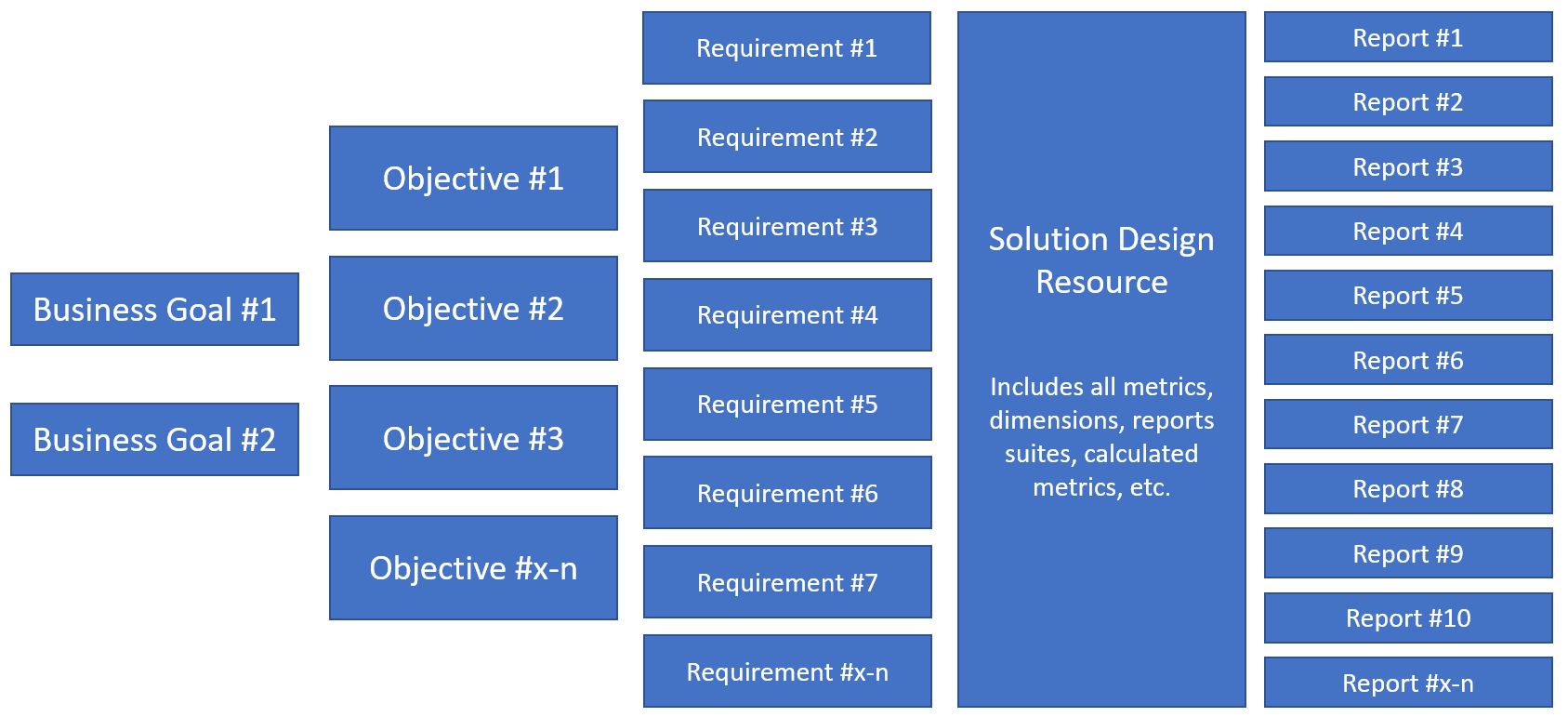
This shows part of the flow that is followed as you set up your Apollo instance:
Everything following out of the Business Goals and Objectives of this Measurement Strategy value tree is prompted from you by Apollo. Keep in mind that I’ve avoided arrows in the graphic, that would typically connect boxes from one column to the next, but as you likely have guessed, there is a one-to-many relationship flowing from left to right, with all the relationships being contained and documented within the Solution Design Resource (SDR).
If you state a requirement such as “I want to report how many orders are placed each day, week, month, etc.,” you select that requirement as needed and Apollo automatically adds all of the variables, data layer objects, tagging, etc., that you’ll need to track within the SDR.
More about that SDR: Unlike all of the SDRs I’ve ever encountered, the one in Apollo is part of its relational database. That means it can be exported to Excel if you feel inclined, but lives as a dynamic document that revises itself every time you make a change to requirements, metrics or reports.
So when you join an organization using Apollo, you never have to encounter all of the lapses and omissions that come from an SDR that is only half-heartedly updated as an Excel file (often in several versions, causing you to wonder which contains the most “honest” implementation snapshot!).
Leveraging APIs to Adobe Analytics, Launch, and even Workspace
How does Apollo populate your instance of Launch? It’s connected via API to your instance of of both Adobe Analytics and Launch. Since it adds Launch tags, all that’s left is for you to do is refine its work and begin the testing.
And because most implementations require IT to install or update the data layer, Apollo auto-generates the JSON code for that data layer. This makes the work of IT easier, improving the odds of speedy deployment.
Finally, Apollo helps you at least two ways to debug the implementation once it is deployed. It uses those API connections to identify errors, and pushes to Adobe Workspace the reports that can make visual review of the data easier.
Speaking of Workspace, all of the reports that are specified in this digital analytics “time machine” are pushed there, so all you’ll have to do is review and refine them.
Apollo has impressed me so much that I can’t wait to get my hands on the working system, for my first client to use it. If you’re also intrigued, contact Adam for a demo. Like me, you’ll get a glimpse into the future of our industry, where we can spend more time on strategy and insight generation, and less on wrangling code and change requests.